Sonar Positions
For some internal calculations and display purposes, it’s useful to know the absolute sonar positions. These are entered as positions relative to the coordinates of the first hydrophone streamer configured in the PAMGuard array manager.
To set the sonar coordinates, from the PAMGuard settings menu select ‘Tritech Acquisition>Sonar positions …’
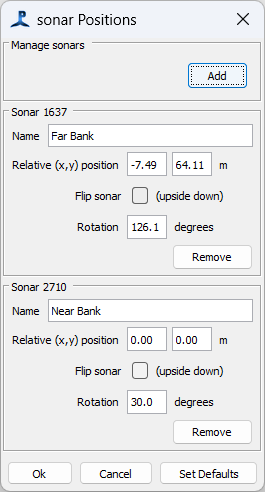
In the dialog, you should see a panel for each sonar that’s been detected by the system. For each, enter the absolute coordinates in metres and as a clockwise rotation and whether the sonar is mounted upside down. (support for other orientations may be added later). You can also give the sonars a name, which will appear on the sonar display.
- If multiple sonars are in use, the absolute positions of detection points are used in tracking, that joins tracks across sonars.
- The sonar data can be shown on the PAMGuard map display, in which case the absolute positions are used relative to the position of the hydrophone streamer. For a static installation, set the reference position of the streamer to a fixed position.
- On the main Tritech sonar display, the rotated positions of the sonars can be used to correctly orientate the sonars, although the absolute positions are not used on this display.
Absolute position data may also be needed by other modules using sonar data.
Absolute positions are not stored in data files, which continue to store data purely in terms of angle and distance for each detection point.